





Valve’s New Steam Frame VR Headset: Specifications, Price, and Prospects for LBE
Valve’s Steam Frame is a standalone VR headset designed primarily for wireless streaming of games from a user’s Steam library on a PC. The device can also run compatible VR and non-VR games locally without being connected to a computer.
Steam Frame uses SteamOS, an ARM processor, eye tracking, and its own wireless streaming system. For local execution, the headset supports native ARM64 applications, Windows games via Proton and FEX, as well as Android applications through the Lepton compatibility layer.
On September 14, 2026, Valve announced the launch of Steam Frame and opened registration for device reservations. The 256 GB version starts at $1,059, while the 1 TB version costs $1,299.
For location-based entertainment (LBE) operators, Steam Frame appears less compelling than it does for home users. The device is considerably more expensive than mainstream standalone headsets, uses LCD displays, and Valve’s official documentation does not describe a dedicated use case for Steam Frame as equipment for LBE venues.
In our opinion, Steam Frame is an interesting consumer technology product, but not a practical foundation for a scalable LBE VR business.
What Is Steam Frame?
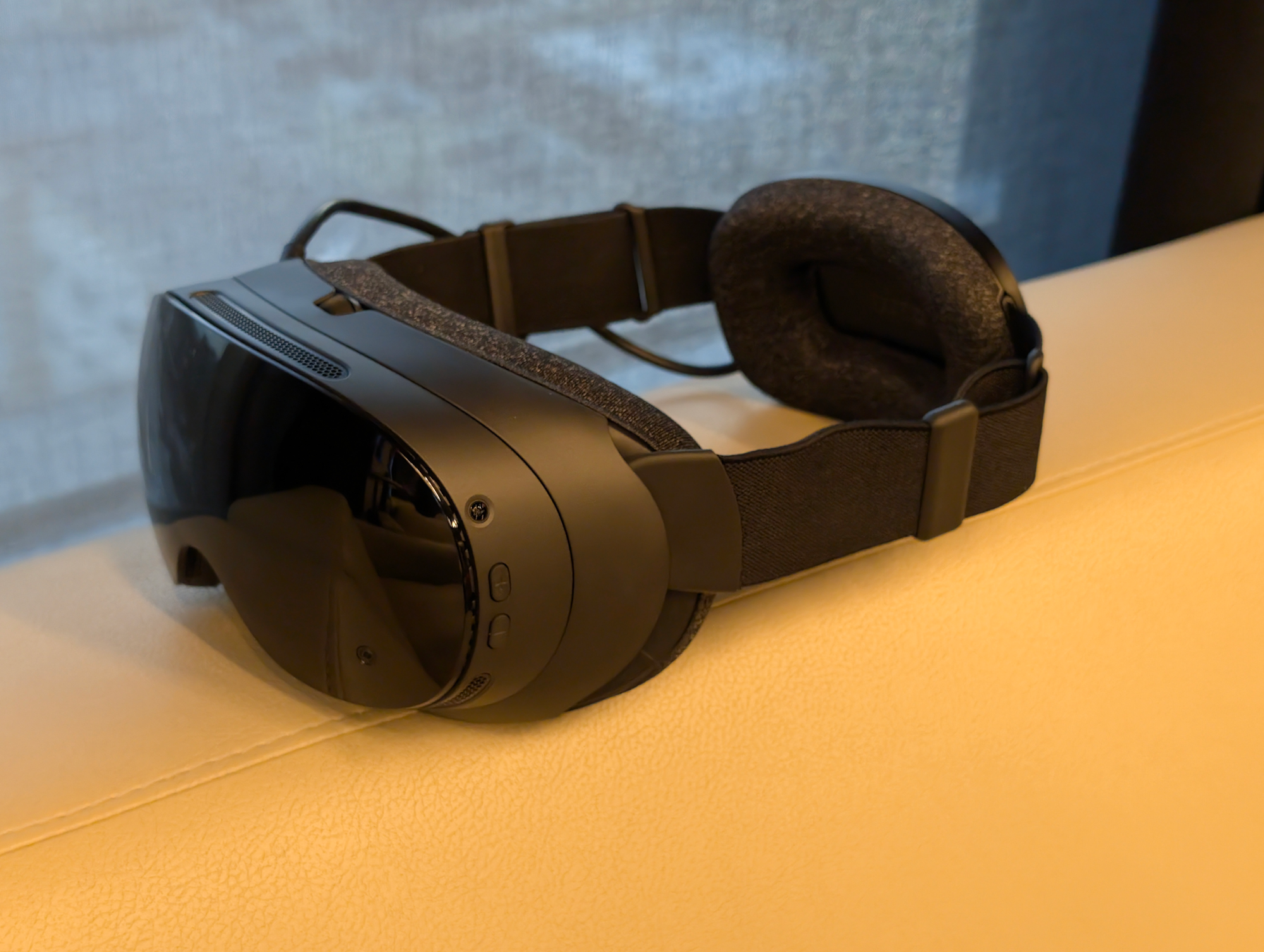
Steam Frame is a standalone virtual reality headset from Valve. Unlike its predecessor, the Valve Index, it does not require external base stations for standard positional tracking. Instead, the device uses an inside-out spatial tracking system in which cameras and sensors are built directly into the headset.
The headset is a standalone computer running SteamOS, although Valve describes low-latency streaming of a user’s Steam library from a PC as one of its primary use cases.
Steam Frame supports:
streaming VR and non-VR games from a PC;
running compatible VR and non-VR games locally;
running Windows games through Proton;
running x86 and x86-64 code on ARM64 through FEX;
running Android applications through Lepton;
running native Linux ARM64 applications.
“Access to the Steam library” does not mean that every game is guaranteed to run directly on the headset. Valve uses the Steam Frame Standalone Verified system and assigns locally executable games one of the following statuses: Verified, Playable, Unsupported, or Unknown. This verification system does not apply to games streamed from a PC.
At launch, Valve stated that more than 100 games had already received Verified status.
Steam Frame Specifications
Steam Frame is built around the Qualcomm Snapdragon 8 Gen 3 with ARM64 architecture. The device includes 16 GB of LPDDR5X RAM and is available with either 256 GB or 1 TB of UFS storage. It also includes a microSD slot for storage expansion.
Key Technical Specifications
| Specification | Steam Frame |
|---|---|
| Processor | Qualcomm Snapdragon 8 Gen 3 |
| Architecture | ARM64 |
| RAM | 16 GB LPDDR5X |
| Storage | 256 GB or 1 TB UFS |
| Storage expansion | microSD |
| Displays | Dual LCD |
| Resolution | 2160 × 2160 per eye |
| Refresh rate | 72–120 Hz, experimental 144 Hz mode |
| Optics | Pancake lenses |
| Field of view | Up to 110° |
| Tracking | Inside-out |
| Eye tracking | Yes |
| External cameras | Four monochrome cameras |
| Wireless connectivity | Wi-Fi 7, Bluetooth 5.4 |
| Battery | 21.6 Wh |
| Headset weight | Approximately 440 g |
| Operating system | SteamOS |
The main computing and optical module weighs 185 g. The battery is positioned at the rear of the standard head strap, while the total assembled device weighs approximately 440 g.
Displays and Optics: LCD Instead of OLED
Steam Frame uses two LCD displays with a resolution of 2160 × 2160 pixels per eye and pancake optics. The headset supports refresh rates from 72 to 120 Hz, with the specifications also listing an experimental 144 Hz mode.
Steam Frame does not use OLED or micro-OLED displays. For a device priced at more than $1,000, this is worth considering when comparing Steam Frame with other premium VR headsets.
Steam Frame is equipped with four monochrome external cameras used for tracking and passthrough viewing of the surrounding environment.
Eye Tracking and Foveated Streaming
Steam Frame features an eye-tracking system. Valve gives developers access to user eye-tracking data through OpenXR and supports its use for foveated rendering, a graphics optimization technology that increases image detail in the area the user is directly looking at while reducing quality in peripheral areas. These capabilities are documented for Unity, Godot, and custom engines.
When streaming wirelessly from a PC, Steam Frame uses foveated streaming, a video transmission technology for VR headsets that saves bandwidth and reduces network load by transmitting only the part of the image the user is currently looking at at maximum quality.
Foveated streaming and foveated rendering are different technologies. The former applies to transmitting the image from a PC to the headset. The latter operates during game rendering and requires support from the application or game engine.
Wi-Fi 7 and Wireless PC VR
Steam Frame supports Wi-Fi 7. A dedicated wireless adapter that connects to a gaming PC via USB is included with the headset.
Valve’s official instructions describe two options for wireless PC VR:
a direct connection through the included adapter;
streaming through an existing Wi-Fi network.
Valve notes that a home network may be more congested and less reliable than a direct connection through the included adapter.
Once connected, the user launches SteamVR on the PC, pairs the computer with the headset, and can use Steam Frame for PC VR without a video cable.
For a home user, this setup makes it possible to establish a dedicated connection between the PC and the headset. LBE environments operate at a different scale: several headsets and computers must function reliably at the same time within the same space.
We do not consider the presence of Wi-Fi 7 alone to be confirmation that Steam Frame is ready for large-scale commercial operation.
Steam Frame Price and Availability
Valve announced the launch of Steam Frame on September 14, 2026, and opened registration for its reservation system.
Users can register for their preferred configuration through September 17, after which Valve plans to determine the reservation order randomly. The first emails allowing customers to complete their purchases are scheduled to be sent starting September 18.
Official launch prices:
256 GB — $1,059 / €1,049;
1 TB — $1,299 / €1,279.
In regions where VAT applies, Valve’s published prices include it.
The package includes controllers, a wireless adapter, and Half-Life: Alyx. A copy of the game can be activated through the device settings if it is not already in the owner’s library.
The power adapter is sold separately. At launch, Valve announced its own 45 W power adapter for $29 in the United States. An Ergonomic Accessories Kit is also available separately for $59, as well as an Accessory Replacement Kit for $49.
For a commercial venue, the cost of the headset must be considered alongside the cost of necessary accessories, consumable items, and gaming PC hardware.
What Is Known About Battery Life
Valve specifies a Steam Frame battery capacity of 21.6 Wh but does not provide a single official battery-life figure in hours in its published specifications. Valve’s official materials alone therefore do not provide enough information to determine Steam Frame’s operating time accurately.
For LBE, this is an important operational parameter: battery life affects session scheduling, charging infrastructure, and the amount of equipment required to maintain uninterrupted operation.
The battery is positioned at the rear of the standard head strap. Valve does not describe it as a user-replaceable, hot-swappable battery module.
Until sufficient data from commercial use are available, battery life can be considered one of the risk factors for a VR venue operating under heavy use.
Planning to open your own VR arena?
ANVIO offers its own multiplayer games, management platform, booking system, training, and technical support. We also help select equipment and verify its compatibility with the chosen venue configuration.
Request a consultationSteam Frame vs. Meta Quest 3
Steam Frame and Meta Quest 3 are both standalone VR headsets, but they use different software ecosystems and focus on different use cases.
| Category | Steam Frame | Meta Quest 3 |
|---|---|---|
| Primary ecosystem | Steam / SteamOS | Meta Horizon OS |
| PC VR | Wireless streaming through SteamVR | Quest Link and Air Link |
| Eye tracking | Yes | No |
| Display | LCD | LCD |
| Passthrough | Monochrome | Full-color |
| Wi-Fi | Wi-Fi 7 | Wi-Fi 6E |
| Local execution | SteamOS + Proton/FEX + Linux ARM64 + Android via Lepton | Native Meta Quest applications |
| Starting price in the US | $1,059 | $599.99 |
Steam Frame offers deeper integration with Steam, eye tracking, and a newer wireless connectivity standard. Quest 3 is less expensive and provides full-color passthrough.
For most consumers, Steam integration alone may not be enough to justify the price difference.
Why Steam Frame Is Poorly Suited to LBE VR
A good consumer headset is not necessarily a good commercial device. LBE equipment must withstand numerous daily sessions, be easy to maintain, and ensure stable operation of multiple devices simultaneously.
1. High Purchase Cost
With a starting price of $1,059, equipping a multiplayer venue would require substantial investment. Gaming PCs, accessories, power adapters, consumable items, and spare equipment would also be required.
2. Unknown Official Battery Life
Valve does not publish a single official Steam Frame battery-life figure in hours.
This makes it more difficult to estimate charging schedules and the amount of hardware required for uninterrupted commercial operation.
3. LCD Displays at a Price Above $1,000
The use of LCD displays is one of Steam Frame’s disadvantages when considered in the context of its launch price.
Visitors are unlikely to perceive an improvement in image quality proportional to the price difference compared with more affordable devices.
4. No Specification for Large-Scale LBE Operation
Valve’s official materials do not provide stated specifications for the simultaneous operation of a large number of Steam Frame headsets in a single commercial VR arena.
The wireless performance characteristics of a single headset cannot automatically be applied to a multiplayer venue without additional testing.
5. Separate Wireless Adapters Complicate Infrastructure
For home PC VR, the included adapter is convenient. At a commercial venue, however, having a separate device for each station increases the number of components and potential points of failure.
An LBE system also requires centralized monitoring, rapid component replacement, and predictable infrastructure management.
6. Steam Commercial Licensing Does Not Solve Hardware Management Issues
Valve provides the Steam PC Café Program, which enables commercial use of Steam games, VR content, and software in public entertainment venues.
For VR arenas, Valve documents a model involving a separate Steam account for each station. Each station requires its own commercial license for the corresponding game, and visitors may only use content for which such a commercial license is available.
Therefore, the problem is not the absence of a Steam commercial licensing mechanism. Steam Frame’s published documentation does not describe specialized tools for centralized headset fleet management, sanitation procedures, replaceable battery workflows, or guaranteed simultaneous operation of a large number of devices.
7. Compatibility of Games Run Locally Must Be Verified Separately
Proton, FEX, and Lepton expand the range of software that Steam Frame can run locally, but Valve does not guarantee standalone compatibility with the entire Steam library.
An LBE operator must verify compatibility for every project using Steam Frame Standalone Verified and practical testing of the selected configuration.
In ANVIO’s opinion, the combination of these factors limits Steam Frame’s practicality for commercial VR arenas.
ANVIO Verdict
Steam Frame is an ambitious and technically interesting VR headset. SteamOS on ARM, eye-tracked foveated streaming, and Wi-Fi 7 demonstrate one possible direction for wireless PC VR.
However, in 2026, the device’s key advantages remain insufficiently tested under commercial LBE operating conditions. At the same time, its $1,059 starting price, use of LCD displays, lack of an officially stated battery-life figure, and the absence of a Valve-published specification for simultaneously operating multiple Steam Frame headsets within a single LBE venue are already known.
In ANVIO’s view, the device may appeal to home users deeply invested in the Steam ecosystem as a niche premium product. However, we do not recommend using Steam Frame as the foundation of a commercial LBE venue.
Commercial VR requires more than suitable hardware specifications. It also requires specialized multiplayer content, centralized management, stable infrastructure, and processes designed for intensive operation.
Want to launch your own VR business?
Contact ANVIO for a consultation or learn more about our VR franchise. We can help you select a compatible hardware configuration, calculate the financial model, and prepare your venue for commercial operation.
Request a consultationFrequently Asked Questions
How Much Does Steam Frame Cost?
The 256 GB version costs $1,059, while the 1 TB version costs $1,299. In Europe, launch prices are €1,049 and €1,279.
Is Steam Frame Available to Buy Yet?
Valve announced the launch of Steam Frame on September 14, 2026, and uses a reservation system. Registration for the first reservation queue runs through September 17, with the first purchase invitation emails scheduled to be sent starting September 18, 2026.
Can Steam Frame Be Used Without a PC?
Yes. Steam Frame can run compatible VR and non-VR games locally. Compatibility is determined through the Steam Frame Standalone Verified system and does not automatically extend to the entire Steam library.
Does Steam Frame Use OLED Displays?
No. It uses two LCD displays with a resolution of 2160 × 2160 pixels per eye.
Does Steam Frame Support Wi-Fi 7?
Yes. A wireless adapter for a direct connection to a PC is also included.
Can Steam Frame Stream PC VR Through a USB Cable?
In Valve’s published documentation, PC VR streaming is described as wireless — either through the included adapter or via Wi-Fi. USB is documented for other purposes, including development, ADB, and power delivery.
How Long Does Steam Frame Last on Battery Power?
Valve specifies a battery capacity of 21.6 Wh but does not publish a single official battery-life figure in hours.
Can Steam Games Be Legally Used in a VR Arcade?
Yes, through the Steam PC Café Program, provided that a commercial license is available for the specific game and the VR station setup defined by Valve is followed.
Is Steam Frame Suitable for VR Arcades?
Valve does not publish a dedicated Steam Frame specification for LBE that confirms operating parameters for large numbers of headsets, battery life under commercial conditions, or specialized fleet-management capabilities. Based on the combination of these factors, ANVIO does not recommend using Steam Frame as the foundation of a commercial LBE venue.
Is Steam Frame Better Than Meta Quest 3?
The devices are designed for different use cases. Steam Frame offers Steam integration, eye tracking, and Wi-Fi 7. Meta Quest 3 uses Wi-Fi 6E, provides full-color passthrough, and has a lower official price.
In ANVIO’s opinion, Quest 3 represents a more attractive option for use in VR venues.


